There are many distinct ways that interactive processes can be modelled, each with different elements that allow for the same processes to be represented from different perspectives. The Interactive Process Model (IPM) discussed here focuses on how different aspects of the overall process interact, by breaking it down into sub-processes, with an emphasis on user actions affecting diverse aspects of the process. The following guide introduces the IPM modelling method and is designed predominantly in relation to modelling video games, though some overlap into similar cases in other areas may be inferred.
Introduction
The building blocks of the Interactive Process Model are self-contained loops called processes (Figure 1). Each of these processes consists of nine different nodes and represents a single path encompassing all elements of the process’ interaction- in other words, from its input all the way to its output, at which point the path would be followed again for the next iteration.
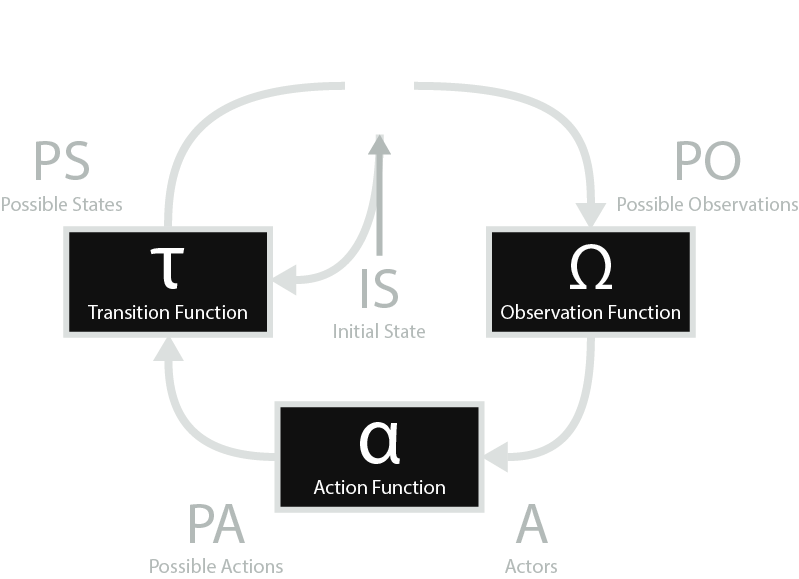
Along with an example in relation to a typical video game’s main process, the nine nodes that make up each process in IPM are as follows. However please note that this is a broad example and lacks the level of detail necessary to fully explain a system.
- the Action Function, represented by alpha (α), which consists of the decision-making rules that the process’ Actors follow when deciding which action to perform
- the player’s decision-making thought process
- the Actors, represented by A, which consists of all agents that can act on the process
- the player
- the Possible Actions, represented by PA, which consists of all actions that any of the process’ Actors can make, regardless of whether the action will be accepted by the system at this time
- run, jump, attack, pick up item, use item, etc.
- the Transition Function, represented by tau (τ), which consists of the rules followed upon receiving input from the Action Function to change the process’ State
- the game’s logic system handled by the code
- the Possible States, represented by PS, which consists of all states that the process can exist as
- the possible values of each variable (e.g. player’s x position, player’s y position, current number of experience points, etc.)
- the State, represented by S, which consists of the current state of the process
- the current value of each variable
- the Initial State, represented by IS, which consists of the state that the process begins in
- the original value of each variable at the start of the game
- the Observation Function, represented by omega (Ω), which consists of the rules followed to output the current state to the Actors
- the way the game is rendered to the player
- the Possible Observations, represented by PO, which consists of all ways in which the State can be outputted to Actors as a result of the Observation Function, with a corresponding observation for each Possible State
- all the possible outputs of the game being rendered to the player
Multiple Processes
All Interactive Process Models consist of one or more processes, depending on the complexity of the system being modelled. While basic systems may only need one process, many need multiple to represent the different elements that make up a single system, as the nodes within a process can be modified in some way. Some examples of when a video game model would require multiple processes include when a difficulty can be selected and so the main process’ Transition Function would be modified based on player input, as well as when visual settings can be changed in a way that modifies how the game is being rendered for the player, and so changing the main process’ Observation Function.
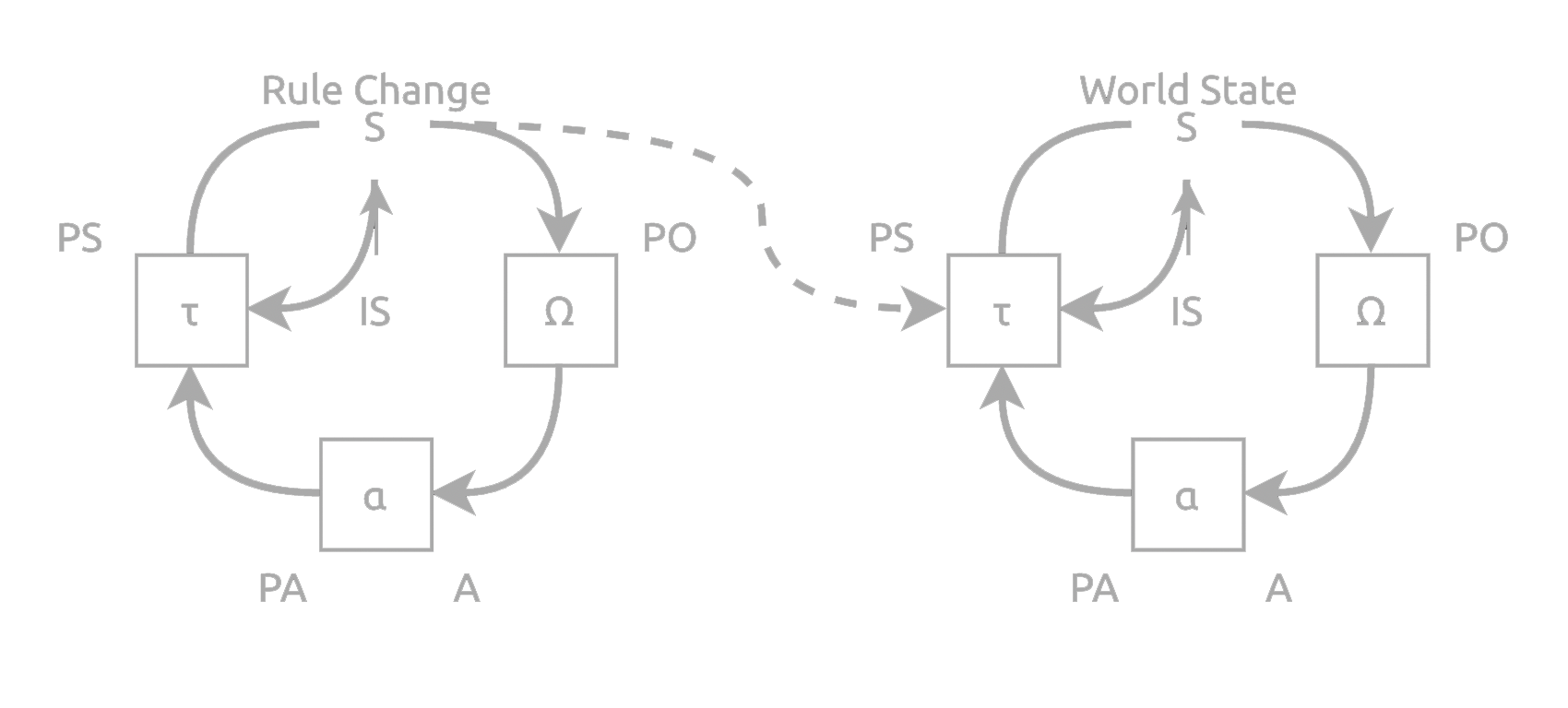
In the cases where multiple processes are needed, a main process is first created to represent the core of the system, for example the game world in a video game. Additional processes can then be added to represent the ability to change any of the nodes of the main process, and then of those additional processes, and so on until no more additions are needed. These new processes will connect to the process they are affecting through an arrow from their State to their target node on the relevant process. In these cases, the State for the new process includes the target node as a state-like target object, which can then be affected through the inputs given to this new process. An example of a model with multiple processes is given (Figure 2).
Creating Models
Every Interactive Process Model has a main process, and so the creation of every process begins with this. From here, we look at each node in turn and ask ourselves “Can any agent observe or change this element?” For each node to which we answer yes, a new process is required to properly represent how it can be changed. However, it is important to keep in mind that in some cases multiple nodes will be targeted by the same additional process, so there will not necessarily be one additional process for each yes we answer. An example of this is when an additional process is required to navigate between the game and the menus; this process will likely have both the game’s main process’ Actors as well as the menu process’ Actors as its state-like target objects, as the purpose of this process is to allow for the player to move themselves between the two existing processes.
Once the question “Can any agent observe or change this element?” has been asked of every node of the main process, it can then be asked of every node of the newly added processes, and then new processes can be added as we answer yes to the question. This is then repeated until we have answered no to all new nodes. The model is now complete!
Influence Paths
An important aspect of the Interactive Process Model is its influence paths. Each model has a set of one or more paths that serve to represent how individual actions can affect the various processes within the model. Each influence path starts at a process’ Action Function, where anActor can interact with the system by giving input that will ultimately result in output to one or more Actors. The influence path then continues along the arrows within and between processes until it reaches another Action Function, where the output will be received by the Actor(s) via the Observation Function. Any time there is more than one arrow exiting a node, a new influence path is created, beginning at the same initial Action Function and branching out where the paths split. Every path that can be followed, that both starts and ends at an Action Function, is considered an influence path.
Influence paths allow for us to see the ways in which the various processes within a model are connected, through highlighting a clear link between potential inputs and outputs throughout the system. For example, an influence path that ends at the main process’ Action Function may have started at the Action Function of a sub-process of one of the main process’ sub-processes; in this case the link between the start and end might not have been immediately noticeable. With the help of influence paths, we can see such connections and realize how seemingly unrelated input may be able to impact diverse aspects of the system being modelled.